How Does the Photo Verification Process Work?
The verification process on Sequel is an optional step designed to ensure user authenticity and improve platform safety. It involves a quick photo check where you will be asked to replicate a simple gesture shown on the screen. Also, you can read more about verification here
Step-by-Step Guide
1. Start the verification: As you swipe and explore the app, the system may prompt you to start the verification process. (Note: If you choose to skip this step, you will not receive a "Verified" badge next to your profile).
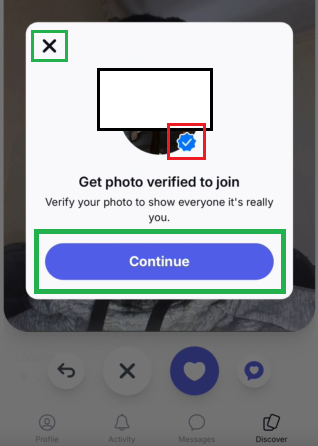
(Note: If you choose to skip this step, you will not receive a "Verified" badge next to your profile).
2. Follow the instructions: A specific hand gesture will be displayed on your screen. Your task is to replicate it.
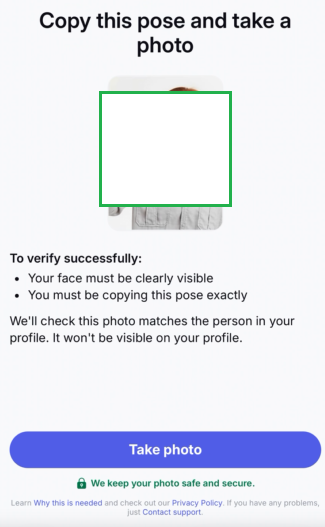
3. Take a live photo: Use your device's camera to take a selfie in real time. Please note that uploading an existing image from your gallery is not allowed.
4. Review and retake: If you are not satisfied with the photo, you can easily retake it before submitting.
5. Submit: After submission, you can continue using Sequel normally while your verification is being processed in the background.
6. Confirmation: Once your verification is approved, you will receive a confirmation pop-up in the app!
Important Notes for a Successful Verification
Your verification will be approved quickly if you ensure the following:
Your face is fully visible in the frame.
Your face is not covered by hands, sunglasses, hats, phones, or other objects.
You are clearly identifiable and can be matched with your existing profile photos.
You accurately reproduce the requested hand gesture.
Photo Quality Check: If you haven’t added a profile photo yet, or if your current photo was rejected or is of poor quality, you may receive a notification asking you to upload a clear photo first before completing the verification.
We truly appreciate your effort in making Sequel a safer community. If you have any questions in the meantime, please contact our Support Team — we are always happy to help!
Was this article helpful?
That’s Great!
Thank you for your feedback
Sorry! We couldn't be helpful
Thank you for your feedback
Feedback sent
We appreciate your effort and will try to fix the article